


Bleap Card
#145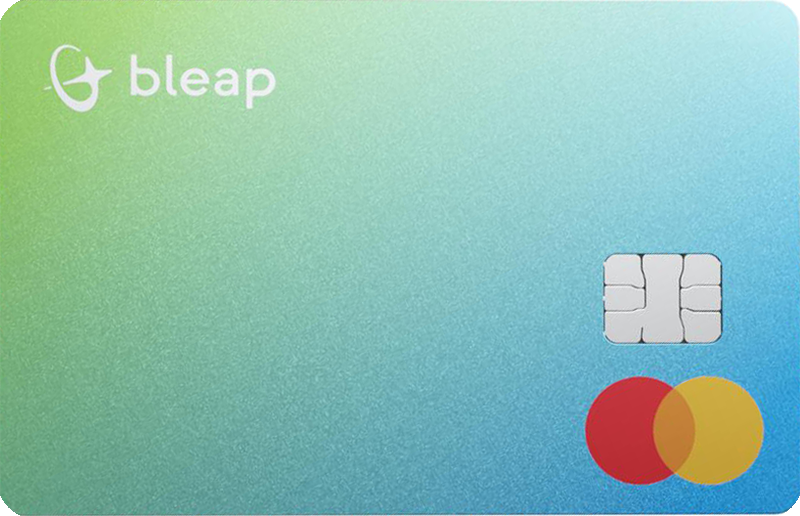
Bleap is one of Europe's strongest crypto debit cards for everyday spenders. It pays real cashback with no staking, charges 0% FX, and keeps you self-custodial. The catch: top rates are category-limited and it is EU-only.
Get Bleap CardAvailability
Rewards rate
Up to 20%
FX fee
0%
Savings
Up to 3.85%
Availability
33 countries
Bleap CardMain perks
Bonus offers
Rewards
Pros
Cons
Options to Bleap Card


FAQs
Questions, answered
The Bleap Card is a debit card connected to Bleap's non-custodial wallet and money app. It lets eligible users spend supported euro and dollar balances at card merchants, while Bleap handles the payment through conventional card infrastructure.
The card is available in virtual and physical form. The virtual card can be used online and through Apple Pay or Google Pay, while the physical card adds normal in-store and ATM use.
What makes Bleap different from many exchange-issued crypto cards is the wallet model. Bleap describes its wallet as non-custodial, so users retain control of their assets rather than depositing everything with an exchange. Card payments, however, currently draw from supported EUR and USD balances such as EURe and USDC rather than directly spending volatile crypto at the merchant.
Yes. Bleap received authorisation in Latvia in June 2026 to provide regulated crypto-asset services under the EU Markets in Crypto-Assets Regulation, MiCA. Bleap says this authorisation allows its regulated crypto services to be passported across all 27 EU member states.
The important distinction is that MiCA does not automatically regulate every feature in the Bleap app in the same way. Bleap's own MiCA announcement states that some products, including certain trading, vault and self-hosted wallet features, fall outside the scope of its MiCA-regulated services.
For users comparing crypto cards, the regulatory status is still meaningful because Bleap operates its crypto-asset services through an authorised EU entity rather than relying only on a third-party exchange licence.
Yes. Bleap describes its Magic Wallet as non-custodial. The wallet uses MPC and smart-wallet infrastructure so the user retains ultimate control over the assets rather than Bleap being able to move them unilaterally.
Bleap's Help Centre says users can export their private key and also includes a Slow Withdrawal mechanism that allows funds to be recovered without Bleap's cooperation after a security delay. That is an important distinction from a centralised exchange account where the platform controls withdrawals.
Normal wallet transactions can still use Bleap's co-signing service for convenience, and card payments rely on separate payment infrastructure. Self-custody therefore describes control of the underlying wallet assets, not the entire merchant-card settlement process.
The Bleap Card currently spends from supported euro and dollar balances rather than directly deducting volatile cryptocurrencies such as ETH or SOL at the point of sale.
Bleap's Help Centre says card payments use EUR and USD balances funded by stable assets such as EURe and USDC. If you hold another cryptocurrency, you first convert it into a supported spending balance inside Bleap, then use the card normally.
This distinction is useful because the wallet can hold and manage many crypto assets even though the card's payment balance is narrower. It also means the merchant does not need to accept crypto. From the merchant's perspective, the transaction is processed as a normal card payment while Bleap handles the conversion before spending.
Bleap currently offers up to 20% cashback, paid in USDC. The rate depends on the merchant or spending category rather than one flat percentage across every purchase.
Current examples include 20% on selected streaming, AI and gaming merchants, 3% on travel and food delivery, and a 1% base rate for restaurants, supermarkets and other eligible spending. The exact merchant mapping can change, so the cashback page should be checked before relying on a specific rate.
Bleap also applies eligibility rules and fair-usage limits. Transactions routed through Curve, excluded merchant categories, pending transactions and spending above the applicable monthly cashback limit may not earn rewards. Cashback is credited after the qualifying card transaction is completed.
Bleap currently advertises no card issuance fee, no monthly maintenance fee, no Bleap card-spending fee and no Bleap foreign-exchange markup for card purchases.
That does not mean every action inside Bleap is cost-free. The current fee schedule says crypto buys, sells and bridges can include a spread in the quoted asset price, and blockchain network costs can also apply depending on the transaction. Third-party banks, card providers or ATM operators can impose their own charges.
For card comparisons, separate card spending from crypto trading. Bleap's card itself can be inexpensive to use, while the cost of converting a volatile asset into the EUR or USD balance needed for spending depends on the live quote shown before confirmation.
Bleap currently advertises 0% FX markup and no foreign transaction fee from Bleap when using the card abroad. This is one of the product's main travel features.
The card can spend supported euro or dollar balances, and the conversion needed for an international card transaction is handled through the card network and Bleap's payment infrastructure. Bleap says it does not add a separate weekend surcharge or card FX markup.
Users should still check the currency presented by the merchant or ATM. Dynamic currency conversion offered by a merchant or cash machine is controlled by that third party and can use an unfavourable rate. Choosing to be charged in the local currency is usually the cleaner way to let the card network handle the conversion.
Yes. The physical Bleap Card can be used at compatible ATMs. Bleap currently advertises ATM withdrawals without a Bleap withdrawal fee.
A third-party ATM operator can still charge its own surcharge, and foreign ATMs can offer dynamic currency conversion that changes the exchange rate applied to the withdrawal. Those costs are outside Bleap's control.
ATM access is one reason to choose the physical card rather than relying only on the virtual card. Before travelling, check the withdrawal limits shown in the Bleap app because card limits can be updated over time. If an ATM displays a separate operator fee or offers to convert the amount into your home currency, review the total carefully before confirming.
Yes. Bleap supports both Apple Pay and Google Pay for its virtual card. Eligible users can add the card to a compatible phone or device and begin making contactless payments without waiting for the physical card.
Mobile-wallet payments use the same Bleap card balance, cashback rules and card fees as a normal card transaction. Adding the card to Apple Pay or Google Pay does not change how the underlying EUR or USD balance is funded.
This is useful for new users because the virtual card can be activated quickly and used for online subscriptions or in-store contactless payments. Device and regional wallet eligibility can still affect enrolment, so the current app should be checked if the card cannot be added.
Bleap currently says card applicants must reside in the EEA or Switzerland and must not have a nationality on its restricted-nationality list. Even within the EEA, card rollout can vary because of regulatory and partner constraints.
This means living in an eligible region does not guarantee that the card is already enabled for every account. Bleap's Help Centre says some users may see a 'Coming soon' label in the Cards tab even when other Bleap services are available.
Applicants also need to complete the identity-verification requirements shown in the app. Because country and nationality restrictions can change, the live eligibility article and the Card section in your verified account are the best sources before applying.
Bleap supports bank transfers and crypto funding. From the Add Money section, eligible users can use a manual bank transfer, a connected wallet or a manual crypto transfer, depending on the options available in their region.
Bleap says bank transfers typically arrive within one business day, while crypto transfers can be credited much faster once confirmed. Connected wallets can also be used to top up the Bleap wallet on supported networks such as Arbitrum, Base and Solana.
If the goal is card spending, make sure the resulting balance is available in a supported card currency. Bleap's current card documentation says payments use EUR or USD balances, including stable assets such as EURe and USDC, rather than arbitrary crypto holdings.
Bleap has rolled out dedicated IBANs for eligible users. Its Help Centre describes the dedicated IBAN as a personal account number associated with the user, allowing euro transfers to arrive directly into the Bleap account without the older shared-IBAN reference process.
When euros arrive, Bleap credits the corresponding euro-denominated balance used inside the app. Availability has been introduced gradually, so users should always use the bank details currently displayed on their home screen rather than copying older transfer instructions.
A personal IBAN can make Bleap more useful for everyday money management because it provides a direct route for euro bank transfers alongside crypto funding. It does not change the self-custodial design of the crypto wallet itself.
Yes. Bleap markets the card for global spending wherever the card network is accepted, including online purchases, in-store payments, subscriptions and travel.
The main travel advantage is Bleap's current 0% FX markup and absence of a Bleap foreign transaction fee. Cardholders can spend from supported EUR or USD balances and use the physical card at compatible ATMs.
International acceptance is still subject to normal merchant and network rules. Bleap's Help Centre notes that some merchants apply geographic restrictions and may reject cards issued outside the customer's account region. For travel, it is sensible to keep a backup payment method and to avoid merchant or ATM dynamic currency conversion when the offered rate is poor.
Download Bleap, create an account and complete the identity verification required for card access. If your residence and nationality are eligible and the card is enabled for your account, open the Cards section and request the available virtual or physical card.
The virtual card can be activated quickly and added to Apple Pay or Google Pay. The physical card adds ATM access and traditional in-store card use.
Before ordering, check that the Card tab does not show 'Coming soon', because Bleap's rollout is not identical for every EEA or Swiss resident. Once the card is active, fund the Bleap wallet and make sure you hold enough EUR or USD balance for spending.
For account, verification, card or wallet issues, use the official Bleap Help Centre at https://help.bleap.finance or contact support through the Bleap app. The Help Centre contains dedicated guidance for cards, fees, eligibility, wallet security, bank transfers and crypto funding.
For a declined card payment, keep the merchant, amount, date and any error information available. For an on-chain issue, keep the network and transaction hash ready so support can identify the transfer.
Never share your private key, wallet password or recovery credentials with someone claiming to be support. Bleap's self-custodial model means those secrets control access to your wallet and legitimate support should not require them.